Showing posts with label smartphone application. Show all posts

ChargePoint Home: Connected EV Charging with Style

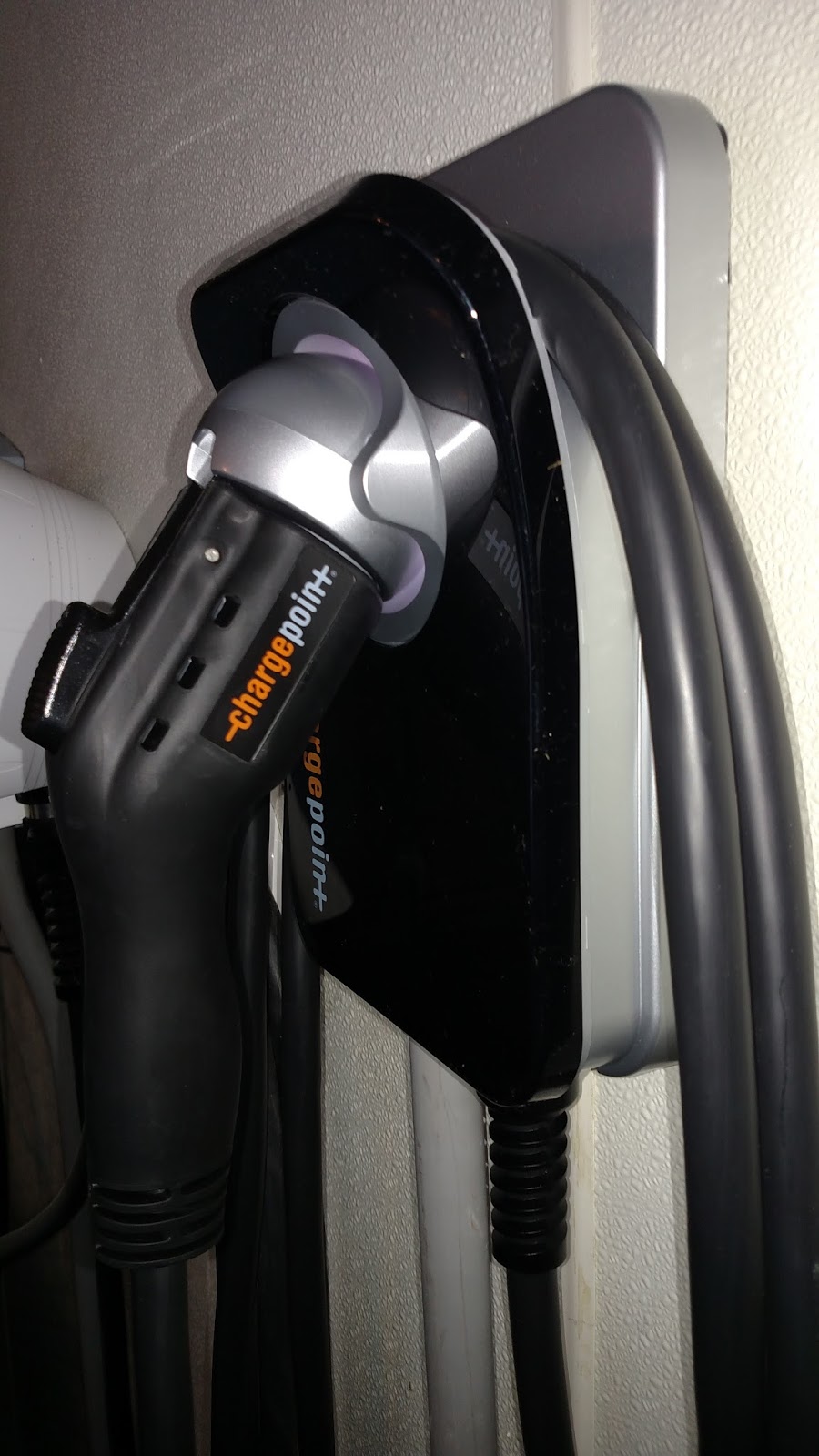
The ChargePoint Home 25 EVSE is the latest addition to my EVSE collection
When most electric vehicle owners think of ChargePoint, they likely are thinking about public charging infrastructure. That's because for the past five years, ChargePoint's focus has been on installing and maintaining the largest network of public EVSEs in the US, with well over 20,000 locations currently in use.

Back in 2012, ChargePoint did release an EVSE for home charging, the CT500 made by Coulomb Technologies, but it was priced a bit above the market at $2,495. At the time, it was the only home EVSE that was networked, so that was a major advantage. However, the price was prohibitively high and competitive units were selling for half of that, so the CT500 never sold in any serious volume.

That won't be the case with ChargePoint Home, ChargePoint's new entry in the home EVSE market. I've had the opportunity to test this product for a month now, before the official launch and I've been really impressed.
Options

There are two power levels offered, a 16 amp unit (The ChargePoint Home 12) and one which can deliver up to 32 amps (The ChargePoint Home 25). If you're wondering why "12" and "25" are used in the product names it is because ChargePoint is advertising that the 16 amp unit is capable of adding 12 miles of range per hour to the typical EV, and 25 miles of range per hour for the 32 amp unit. I'm not particularly fond of using that method to name them, since every EV is capable of achieving different levels of efficiency. Plus, I think it may confuse some people who think the number is the amps the EVSE is capable delivering. However, this is only the name so it's not really a big consideration.

Since I'm discussing the power delivery, this brings me to one of the few criticism I have for the new ChargePoint Home. While 32 amps is above the maximum charging limit for any currently-offered electric vehicle that isn't a Tesla or that uses a Tesla onboard charger (Mercedes B-Class ED), some of the competition is now offering 40 amp and 50 amp home charging solutions. These would be attractive for Tesla owners, and perhaps someone who wanted to future-proof their garage. I suspect ChargePoint would be ready to offer a higher powered version in the future if there are any new electric vehicles offered that can accept more than 32 amps. However, considering the current electric vehicle offerings, 32 amps is fine.

I got the optional 25' cord
After selecting whether you want the 16 amp or 32 amp EVSE, you then have the option of choosing a hard wired unit or one that plugs in. The 16 amp plug-in version uses a NEMA 6-20 outlet and the 32 amp plug-in EVSE uses a NEMA 6-50 outlet. Once that is decided you can choose the length of cable you want, but that's only if you buy the 32 amp version. For some reason, the 16 amp version only comes with a 12' cord, you cannot order it with one longer. That could be a deal breaker for some people whose garage is set up in a way that twelve feet of cable won't reach their charge port. On the other hand, the 32 amp unit comes standard with an 18' cord, and has an optional 25' cord for an additional $50. It's a bit puzzling why the lower powered unit isn't available with a longer cord, and I believe this will steer many potential customers to the higher powered EVSE, even if they originally considered the lower powered unit (maybe that's the plan!).  I did reach out to ChargePoint about this and was told that a customer can order a replacement cord of either 18' or 25' length and replace the 12' standard cord that comes with the 16 amp EVSE. I didn't get the pricing, but I assume it will cost considerably more than the $50 up-charge when you upgrade from an 18' cord to the 25'cord on a ChargePoint Home 25 (32 amp). The rep also told me that if there is demand for longer cords on the 16 amp unit, then ChargePoint will consider offering it at a later date.

Installation

Drill bit & nut driver
If you choose to go with one of the plug-in versions, you'll need to have an electrician install the appropriate outlet in your garage. The 16 amp unit requires a 20 amp, 240v dedicated circuit with a  NEMA 6-20 outlet and the 32 amp EVSE requires a 40 amp circuit with a NEMA 6-50 outlet. I chose the 32 amp hard wired one, with a 25 foot cord. Since I was replacing one of my older EVSEs with the Home unit, it was an extremely simple process, and that wasn't by accident. ChargePoint made every effort to make installing the Home EVSE as easy as possible, especially if the owner was swapping out an older EVSE for the new Home unit. In that case, it's so easy to do that the average person can probably complete the installation in less than an hour. I had mine installed in about 30 minutes. A drill bit and nut driver for the supplied wall mounting screws are even included. One aspect of the installation I found curious is that all three mounting screws run down the center of the unit, as opposed to the four corners. This could possibly cause the EVSE to rock a bit from side to side if the wall it's mounted on isn't flat. I'd prefer if the mounting screws were in the four corners, which would provide for a more secure mount on uneven surfaces.


                                  ChargePoint Home installation video

Another great feature is how compact, lightweight and portable the ChargePoint Home is. At only 11.2" by 7" it's stylish and not bulky. It has a back-lit connector holster which swivels up and down and that helps to make returning the connector to the base easy, even in the dark. If you choose the plug in version, you can easily take this EVSE with you for charging away from home. All you would need is the appropriate outlet at your destination. The ChargePoint Home is indoor and outdoor rated and is UL listed.


The ChargePoint app displays useful charging information such as current and cumulative energy draw. You can also set a "Remind Me to Plug in" notification, so you never wake up to an uncharged EV.

Connected

Perhaps the best feature of ChargePoint Home is that it can be integrated with your ChargePoint account which allows the user access to information from the ChargePoint mobile app. This includes viewing information on the current charging session, remotely start and schedule charging, set notification reminders so you don't forget to plug in, review data on past charging sessions, and it even works with Nest thermostat products which can help save energy.

ChargePoint Home EVSE pricing starts at $499 for the Home 12 hard wired station and goes up to $749 for the Home 25 plug in station with a 25 foot cord. Full pricing details are below. ChargePoint Home has a three year warranty and is available through Amazon.

ChargePoint Home 12: 16A Hardwire station with 12' cord$499
ChargePoint Home 12: 16A Plug station with 12' cord$549
ChargePoint Home 25: 32A Hardwire station with 18' cord$649
ChargePoint Home 25: 32A Plug station with 18' cord$699
ChargePoint Home 25: 32A Hardwire station with 25' cord$699
ChargePoint Home 25: 32A Plug station with 25' cord$749
Slim, compact design


I've been using my ChargePoint Home 25 for a few weeks now and I really like it. ChargePoint has a winner with this EVSE, and I predict it will sell very well. I've been driving electric for over six years now, and I've seen the evolution of EVSE products. It's good to see the products continue to improve just as the prices continue to go down. The ChargePoint Home delivers on size, portability, quality and ease of installation. It's stylish, competitively priced, and best of all connected to the ChargePoint Network which allows the user mobile access to effective tools which can enhance their electric lifestyle. This all adds up to great news for EV owners.


Note: I received for free, one ChargePoint Home 25 EVSE from ChargePoint for testing, feedback and product review publication before the consumer launch. No other compensation was made.

BMW i3: Understanding How Preconditioning Works

Setting the preconditioning feature from the i3's iDrive is simple, but not as intuitive as I believe it could be. You can set the time of departure for every day of the week and the i3 will be charged, preconditioned and ready, provided you're charging from a proper 240v, level 2 electric supply. 
In many ways electric cars are very similar to their internal combustion counterparts and that's by design. Most major OEMs are afraid to make something that's "too different" from what their existing customer base is comfortable with. However there are features in electric vehicles that are indeed drastically different. The first one that comes to mind is regenerative braking which allows the electric motor to convert the vehicle's kinetic energy back into electricity which in turn recharges the battery. This feature changes the driving dynamics of the car (some more than others depending on how aggressive the regenerative braking system is) and the operator needs to adjust to this when they first transition to an electric vehicle.
During the winter months preconditioning in New Jersey not only means getting into a warm car in the morning, but it also adds valuable miles to the car's range by warming the battery cells up to their preferred operating temperature.
Another unique feature most modern electric vehicles have is the ability to precondition (warm or cool) the high voltage traction battery as well as the passenger cabin. This allows the driver to begin their journey with a properly heated or cooled battery and cabin, while still having the state of charge at or near 100%. Some conventional combustion cars also allow you to remotely start the vehicle to warm it up in the winter or cool it off in the summer, but the reasoning behind that is purely comfort-driven, and with EVs it goes beyond that. Since electric vehicles have shorter range and longer refueling times than their combustion counterparts, it's important to save the energy in the battery for its main purpose; to propel the vehicle, and not waste too much of it on ancillary power draws.

Warming the battery and the cabin uses a lot of energy, and doing so while the vehicle is plugged into the main power allows the driver to begin their trip with a properly warmed battery (which will increase the range) and still have a fully charged pack. This is very important for EV owners in cold weather climates. It is also useful to cool the car in hot ambient temperatures, but more frequently used by EV owners in the cold since a cold battery can reduce its range up to 30%. A hot battery won't reduce the car's range, but it can have an adverse effect on the longevity of the battery cells. Therefore preconditioning the battery in very hot climates is also advised, but for different reasons than doing so in the cold.

During the day my i3 is parked outside while I work. Accessing the preconditioning from my iRemote app is very useful as I don't have to go outside to the car to turn it on.
OK, so it's clear preconditioning is useful, but do you really know how it works on your i3? I'm afraid most i3 owners don't. In fact, judging by how many people have messaged me this winter asking for help with preconditioning, I'm thinking it's right up there with how to properly care for their battery as the top misunderstood items of i3 ownership. This is all new stuff, and even most dealers don't know all of the answers so it's no surprise the customers are a bit confused. This post should clear the air on most questions about how preconditioning works on your i3. I knew how most of the i3's preconditioning worked, but just to make sure I didn't have anything confused, I reached out to BMW's top electric vehicle technical services manager in the US to get answers to direct questions that I had previously received from readers:


Q. When Preconditioning via the iRemote app Remote Control menu is activated, only the cabin is preconditioned, not the battery, correct?
A. When triggering Preconditioning from the Remote Control menu, the answer is Yes, only the cabin.

Q. If you want to precondition the battery from the app, you need to set the departure time and then enable “preconditioning for departure," correct? 
A. Yes, provided the departure time programmed is at least 3 hours from the time when it is selected.
*Important: This is a very important fact that most i3 owners are not aware of. If you don't set the departure time at least three hours in advance the car is not performing battery preconditioning at all, only the cabin will be preconditioned.

Q. Can you precondition the battery without the vehicle being plugged in?
A. The HV battery, no. The cabin, yes.

Q. Can you precondition the battery while the vehicle is plugged into a 120v source or does it need to be connected to a 240v source?
A. 120V (Level 1/OUC) or 240V (Level 2) have the same effect in terms of Preconditioning. However, if charging on Level 1, the preconditioning consumption is higher than the charge rate, therefore potentially the vehicle will not be fully charged at the departure time.

Q. How early before the departure time will the vehicle begin to precondition?
A. When using the vehicle preconditioning menu, it will depend on temperature, but generally 30-40 minutes prior to the set departure time the cabin preconditioning will start, and the battery preconditioning will start 150 minutes prior to that.

Q. Will the car ever turn a battery warming on by itself if the battery temperature gets critically low. For example, the car is parked outside and plugged in and the battery temperature drops below 30 degrees, will the preconditioning turn on and warm the battery up without owner intervention?
A. No. User intervention is required for battery preconditioning. If the battery temperature is very low, it will be outside its normal operating temperature. As a result, the power output and usable energy of the battery will be reduced.

Q. How about if it gets critically hot – over 105 degrees?
A. If the battery temperature is higher than the optimal operating range and preconditioning is activated, the battery can be cooled. This is not very common due to the fact that the battery is such a high thermal mass, is located close to the ground, and is not exposed to direct sunlight.

Q. Why is it that sometimes after preconditioning (plugged in) the car is left at 97% or 98% SOC? Why doesn’t it fully recharge the car to 100%?
A. When preconditioning using a Level 1 charger, the car will always be below 100%. It could be about 80% or lower.(Because it uses more energy than the 120v source can provide) When using a Level 2 charger, the SOC could be slightly under 100% as the vehicle electrical load stays somewhat constant while the charger will switch off and on.

Q. Will battery cooling occur automatically while you are driving when the battery temp exceeds a certain set point?
A. Yes.

Q.
When battery preconditioning is being performed, what is the battery temperature that the vehicle is attempting to achieve?
A. The battery is warmed or cooled to bring it close to or within the optimal operating range of 25-40C (77-104F)

I'm certain that the vast majority of i3 owners are not aware that the car does not initiate battery preconditioning unless they set the departure time at least three hours in advance. Also, based on feedback I've received here, many i3 owners aren't aware that they aren't preconditioning the battery if they initiate precon by pressing the small fan icon at the bottom of the main state of charge screen on their iRemote app. By doing so, that only initiates cabin warming or cooling. In order to precondition the battery as well as the cabin from the app, you must set a departure time at least three hours in advance and then slide the preconditioning tab to "on." Don't feel bad if you own an i3 and didn't know all this, most client advisers at many BMW dealerships don't know it either. It's a little confusing at first, and honestly I think the app could be made a little more intuitive, but once you understand how it works, it's easy to set. You can also set the departure times and precon from the iDrive in the car.


Using the "Activate Climate Control" app feature on the left only preconditions the cabin. To precondition the battery as well as the cabin, use the "set departure time" feature which is accessed by pressing the small clock tab on the top right of the state of charge display screen. Once you set the departure time, you also need to slide the precondition tab to the "on" position.

Living in northern New Jersey I get to experience a range of temperature extremes and using the preconditioning feature is definitely helpful. We just finished the coldest month I can ever remember and it seemed just about every day I was leaving the house in the morning with temperatures in single digits or below zero. One day it was actually minus eleven degrees Fahrenheit when I began my morning drive. Even though my car is parked inside my garage, when it's this cold the battery temperature drops to levels that severely impact its performance and the range is reduced. I noticed I could add as much as eight to ten miles to my range if I used the preconditioning on the coldest days. It's also nice to get into a warm car, and this enables you to turn down the cabin heat a bit, which additionally helps extend the range. I found that if I allowed the preconditioning to warm the cabin, I could then lower the cabin heat, or even turn it off for a while and just use the heated seats which use much less energy than the cabin heater. 

I hope this helps i3 owners understand a little more about preconditioning. If you have more questions, please leave them below in the comments section and I'll do my best to answer them.

Born Electric Guest Blogger: Meet Bill from The UK


Hi, my name is Bill and I was born electric on 14 March 2014. 

I've done 2,000 miles in my i3 so far so I thought it was time to contribute first impressions viaTom's blog (thanks Tom). As you can see from my photos, this i3 is definitely not a city dweller, although in the south of England you're never that far from a city to be honest. Driving country lanes so much makes it really tough to keep clean though.

I came to the i3 via a curious route, because I had really been looking for an electric motorbike. Sadly, there are not many to choose from and none from the established mainstream motorcycle producers. The more I looked into things the more I was convinced I could live with the range limits inherent to EVs; my daily commute (25 mile round trip) is very compatible with the range of most pure electric vehicles. Coupled with the luxury of having other family vehicles available if needed, it made it really easy to make the switch. But when I started looking to replace my ICE car, nothing really excited me, until the i3 that is. The focus on weight reduction resonated with what I look for in motorbikes; the development of new car construction technologies was unusual in the EV market and designing the car to be an EV from the ground up rather than converting an ICE model seemed much more satisfactory. All this indicated to me that BMW have a level of commitment to this EV which is very welcome as a consumer. Although the price point of the i3 comes in for some criticism, next to the competition I think it is amazing considering the development. And, in the UK at least, the price benefits from a plug in grant which is not the case for electric motorbikes.

Car specification and options assessment
This car was bought primarily for my daily commute and circumstances meant that I decided early on to go for the pure electric model. The REX is a great choice if you need the daily range or you are buying one as your only family car, but that wasn't my situation. As I was buying a BEV I initially specified the following options to help with range on the odd occasion that I might want or need it.

ZWT Winter pack, includes 494 (heated seats), and ZHV (high voltage battery preparation).
4T9 Auxiliary cabin preparation
4U7 DC rapid charge   preparation

As for the cosmetic options, I will probably keep the car for some time so went for the Suite interior hoping that the leather will wear well. I added turbine 428 wheels and LED headlights, and finally added parking assist when I realized it was the only way to get front parking sensors. The Pro navigation system and real time traffic info was a free of charge upgrade. I chose Arravani Grey as my colour option.

Of the options I didn't chose I'd make the following comments. I've had cars with sun roofs before and never used them. I don't like how cruise control takes away my control of the car so the idea of the driving assistance package did not appeal at all. My commute is virtually traffic free down country lanes so it would not have much use anyway. I don't need to make much use of my phone when on the move so enhanced bluetooth was an option without much benefit. I was coming from a 20 year old Mazda which had no remote central locking so I'm still enjoying the “thrill” of opening it without using a key making comfort access seem like overkill. I don't need the car to have the internet (I have a smart phone) and couldn't justify spending the extra on the premium sound preparation when it cost more than I spent on my home hi-fi speakers. I won't often take more than 1 passenger so the lack of rear speakers is not a worry. On the specification front I would say that a lot of the details about what these options actually do were only filled in after I placed the order, and having owned it for a couple of months I'm still not sure what the adaptive part of the headlight function refers too! 

Having lived with the options I thought scoring them might be of interest to potential buyers:

Winter pack  heated seats hardly affect range at all, even on full chat – a must have for temperate climates 10/10

Auxiliary cabin preparation – not sure how much this helps so difficult to score.

DC rapid charge preparation – time will tell but a potent game changer in functionality terms so I wouldn't be without it 10/10

Suite – love the mix of leather and wood so 10/10.

LED headlights are an expensive cosmetic option which I think I could have done without. As is common on modern lights they produces a blue halo around the edge of the beam which is off-putting for me and other drivers and I quite regularly get flashed by cars heading in the opposite direction even though I only have had dipped beam active. In the past I've had motorbikes which produce a light with a blue halo and I've had cars in front of me on a motorway brake hard and pull onto the hard shoulder because they thought I was the police – not ideal! 2/10. If I did it again I would probably drop LED lights in favor of the premium sound preparation.

Park Assistance front sensors are very handy but the rear camera takes some getting used to using and trust. Park assist parallel parking works very well although day to day I don't have much call for it. 10/10 for how well it works but 5/10 in value terms as it is an expensive option if like me it's just to add the front parking sensor functionality.

Efficiency, Range and average speed
My daily commute is 25 miles and at the end of two days commuting I typically have 25-30 miles of range left, but I haven't tried a third day without charging yet. I commute in Eco Pro mode with the speed limit set to 55 mph. When I can get away with it I just use heated seats (climate control only being used for demisting). Bear in mind that morning temperatures for the bulk of my mileage were rarely above 10 C here and most of the time I've owned the car the evening temperatures have been similar. My 2 day cycle therefore normally includes one pre-warm while attached to the mains and 3 pre-warms without mains. My longest trip between charges was 84 miles with 4 miles remaining. The trip was made early morning at temperatures between 6 and 10 C, the last 15 miles was warmer, up to 14 C. This was in Eco Pro mode with no climate control apart from some occasional demisting, along mostly country lanes and A roads, rarely breaking the 55 mph limit I have set in Eco Pro. The car tells me my average speed is 29.0 mph, average consumption is 4.2 miles/kWh and I've done just over 2000 miles. The car once told me I had 111 miles of range, but I didn't believe it!

Accessories
Public charging cable, cargo net, all weather floor mats and additional 13 amp UK charger. These all work well and like others I find the mats slippery in the wet but this doesn't bother me and I like the way they look. The additional 13 amp UK charger was bought because I wanted to mount the one that came with the car to the wall of my garage but also wanted one to carry around in the car. I've swapped the main beam bulbs for a cooler light as I didn't like the mix of white and yellow beams. I don't have a level 2 charging station at home yet but have started the ball rolling.

Reliability
The app needs a bit of work, both in terms of the functionality it offers and whether it reliably updates. I find the algorithm behind delayed charging (which makes it difficult to predict whether the car will take a charge when you've plugged it in but told it not to) hugely frustrating and wish BMW had included a simple “charge controlled by smartphone” option in the car's charge settings. If I want app control over charging I have to fudge it by swapping from charge immediately to charge using off peak time settings. I've had the car report interruptions to charging a couple of times and I've had it fail to precondition a couple of times but other than that it's been trouble free. A slight grumble with the climate control is that it tends to noticeable oscillate from warm to cold air but I will get used to that. I'm still confused by the preheating function which appears to leave my car with less that 100 % in the battery when attached to the mains. The attachment of the charging socket protective cap to the charging flap leaves a lot to be desired and I still don't have a manual for the Pro-Nav system.  

Public charging
This is my first EV and reading stories about charging points being out of service, ICE'd or otherwise not available has left me nervous about committing to a public charge as the only means of completing my journey. By scouting potential destinations I have confirmed the need to do this as the information about public charging points can be hit and miss. I have come across points listed as operational which were no more than concrete standings and other points listed as public which are really intended for the sole use of the company who have installed them. So when I set out for Bristol which is a 120 mile round trip requiring a charge to complete I was quite nervous, despite having visited and found that the listed charging points were mostly available (most common problem I saw there was being ICED, about 25 % of bays). But the trip went without a glitch and I was pleased to see the BMW app updated the availability in real time which is useful for all users. I moved the car off the bay once fully charged so that another EV could use it. When I returned to the car after the gig I'd been to, the EV bay I'd been in was ICED!

In summary I hope you can tell from my photos that I love the car. The only option I regret including is the LED headlights and if I was buying again I would have swapped the LED lights for the premium sound package. That's not to say that the standard sound is bad, on the contrary it is very pleasing. I could go on as there are so many aspects to this car to but overall so far I'm a  happy EV driver and a very happy i3 owner.

Cheers for now
Bill 

The First Volt Owner in Georgia Explains What He Doesn't Like About the BMW i3... and Why He's Buying One!

Chris Campbell with his Volt. Chris was actually the first Volt owner in the State of Georgia. Now that his 3 year lease is coming to an end he's chosen to replace his Volt with a BMW i3.
Chris Campbell has been following my blogs for a while now, and has commented on many posts. He's an avid electric car supporter and is a member of the BMW i3 Facebook group. Chris has been following the BMW i3 for a while now and he's been really anxious to test drive one. As you'll read below, the driving experience is really important to him - as it is for me. Chris finally has his chance to test drive the i3 (twice actually) and shortly after declared on a post in the Facebook group "I did test drive #2 this morning. That's it, I'm in.". I know Chris knows a lot about EV's, and I know he had his doubts about whether the i3 would be the right EV for him, after all he really loves his Volt. So when I read his declaration, I asked him if he would like to do a guest post here, to offer his story of  how he came to the conclusion the i3 would be the EV that would replace his Volt. He accepted the invitation, and sent me the post below:

GETTING OVER IT AND CHOOSING THE BMW I3

I am an electric vehicle enthusiast.  The wave of EVs in the late 1990s piqued my interested, but it was a lucky chance at a long test drive of a Tesla Roadster in April 2009 that gave me the EV religion.  By 2010 I was ready for a new car and the market was finally ready to give me an EV.  In my case the Chevy Volt was good choice because I have a short commute, well within the electric range of the Volt, but also wanted the ability to take the car anywhere at any time and not have to worry about range.  Note that there was virtually ZERO public charging infrastructure in 2010 when I got the Volt.

Fast forward three years and I'm now at the end of my three year Volt lease, and looking for my next car. The Volt has been great, and in fact I still believe it is the BEST car on the market, especially for anyone new to EVs.  After three years of tweaks, and this year's dramatic price drop, the Volt is even more compelling than when I took my somewhat risky plunge in 2010.  But, for me personally, as my Volt lease ends I'm now looking to move on to the next thing.

I've been following BMW's EV developments closely for a few years now, and after a second test drive this past Friday, I've decided that the BMW i3 is going to be my next car.  I'll explain why, but I'm also going to take a sober look at the car, probably unlike any other i3 review you've seen.

EVs are an absolute thrill to drive, and there was no doubt that my next car would be another EV.  While the environmental and geopolitical reasons for getting an EV are important to me, what really draws me is the sheer power (well, torque) of the electric drivetrain.  Once you experience that "stealth V8" power you just can't live without it.

So, for me, the very top issue in selecting the next car was POWER. How fast was it?  The Volt (and Leaf, even) are deceptively powerful, and a blast to drive, but I consider them to have only the MINIMUM required power.  More is better!  And early reports on the BMW i3 indicated that it was going to be more powerful than anything on the market short of the (sadly unattainable) Tesla models, so I've been following it very closely for over a year now.

There are lots of features that I like about the i3.  The carbon fiber structure is certainly cool.  I'm tall, and the long coupe-style front doors place the pseudo B-pillars (and seatbelt anchors) nicely back and out of my peripheral vision.  The i3 will have an available DC fast charging option, and I decided earlier this year that my next car simply had to have DCFC capability.  The drive train is well engineered, following four years of careful testing in BMW's MINI-E and ActiveE programs.  It's a BMW, so you're going to get a driver's car.

All these things are great, but certainly the car isn't perfect.  No car is perfect.  And in fact, that's how it usually works, right?  You fall in love with a car, then you find out something about the car that you DON'T like, and then you have to decide whether you can get over it.  Do the pros outweigh the cons?

The Nissan Leaf is ugly, has a spartan interior, and has a cheaper battery technology that makes it susceptible to weather extremes.  The Chevy Volt is a bit pricey and can't seat more than two people in the back (and the EV purists turn their noses up at it).  The Ford models have that hulking battery pack messing up the trunk, signifying the worst of "conversion car" engineering.  And so forth -- you can always find something wrong with a car.  Even the vaunted Tesla Model S has problems, most prominently its stratospheric price tag, but upon closer examination there are plenty of other problems.

So, I've got problems with the BMW i3.  Can I get over it?

I'm an engineer, and I can't help but try to analyze this decision soberly and methodically.  Anticipating that I'd be back in the market for a new EV after the Volt lease, a year ago I started assembling my checklist for the perfect electric vehicle.  This long document is a collection of every feature in every EV on the market, and serves as a way to honestly evaluate the cars on the market.  No car is perfect, not even the Tesla Model S, and my list serves to remind me that there are tradeoffs in any car.

With that, I will now itemize the top things that I do NOT like about the BMW i3.  See, I told you this would be unlike any review you'd read!  Again, I've said above that I AM going to buy an i3, in fact I will be happy to be the first in my home state, as I was with the Chevy Volt three years ago, and probably will be as big a cheerleader as anyone about the car (well, except for Tom M...).  But I'm doing this with a clear-eyed view of the pros AND the cons of the car.

In essence, this is a list of the things that I had to "get over" in order to commit to the i3.

IT'S UGLY!


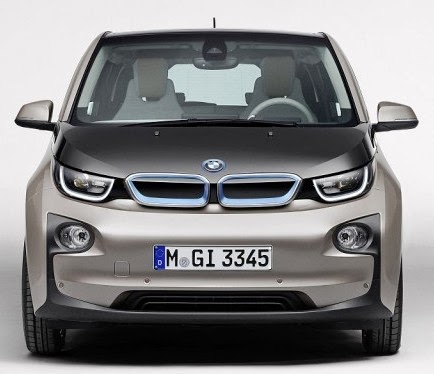
While the i3 has some sexy angles, it has some real stinkers too. Look at it straight on from the front, or straight at the rear.  In both of those angles the weird design is jarring, and the skinny tires jump out at you.  I know, I know, 19-20 inch tires, contact patch size blah blah blah -- it just LOOKS bad.  But it's a thrill to drive!  So I'll get over the looks, or least tolerate the snide remarks.  At least I shouldn't have to worry about those kinds of comments from Nissan Leaf owners, right?  That has got to be the ugliest car on the market, from ALL angles!  Ha!

NO CLIMATE PRESTART ON KEYFOB


You're not going to believe this, but this feature is THE most important feature to me in an EV, putting aside the headline features of the drivetrain, battery and charging technology.  The same way you get addicted to the instantaneous torque of an EV drivetrain, I have become addicted to that little button ON THE KEYFOB of my Chevy Volt that starts up the climate control.  I use it every ... single ... time ... I get into my car (so at least twice daily), from inside the house as I'm getting ready to leave in the morning, and then on the way home as I'm approaching the car at my workplace.  Yeah yeah, sure, I can use the smartphone app -- wanna race?  It takes me 3 seconds (and minimal cognitive engagement) to get the car warming up, and I can do it blind with the keyfob in my pocket.  Try THAT with your smartphone.  Scheduling the prestart doesn't solve this for me because I don't get in the car at the same time every day.

There is a "diamond" button on the i3 keyfob that acts as a panic button, but I've heard a rumor that it is actually *configurable*, and that climate prestart may be one of the configurable options.  If so, congratulations BMW on a brilliant solution, and scratch this off the cons list!  But I haven't seen confirmation, so it remains on my short list of problems with the i3.  Trust me, once you have this feature, you can't live without it.

CHARGE PORT ON WRONG SIDE OF CAR


You will plug and unplug the car EVERY DAY.  That's at least two trips to the charge port location, and therefore it should be as close as possible to the driver's door.  BMW stuck it in the right rear corner, just about the worst possible place.  I'm sure they have their reasons, but from a usability perspective it's just all wrong.  I have seen some factory photos of the CFRP passenger cell that have shown that the interior structure of the car has cutouts on BOTH sides, so it's possible that they may relocate the port to the rear left side in the future, but for now -- it's in the wrong spot and will annoy me twice a day for my entire life with the car.

NO POWER SEATS
Power seats aren't even available as an option.  It takes me forever to get the seat adjusted just right, and thus I really want the memory function of the power seats so I can put it back the way I like it after someone else has driven the car (spouse, mechanic, etc.).  A car that approaches $50,000 when loaded with options should offer power seats as one of those options.  And don't try to tell me that it's left out for energy saving reasons, that's simply nonsense.  I'll buy the weight savings argument, but still, this should be an option.
 
WHAT'S NOT ON THIS LIST

There are many things that other people have complained about that are NOT a problem for me:

- It's a four seater.  You can't put three people in the back seat, even three kids, as there's a console in the middle and no third set of seatbelts.  That's fine with me.


- There is no SOC percentage showing the exact state of the battery charge.  I know the other i3 fans are screaming about this, but I could not care less.  I'll trust the indication of mileage remaining, and will eventually learn how to correct for challenging driving ahead.

- Range: 80-100 is plenty for me.  In fact, using the VoltStats.net data from my last three years of Volt driving, I recently found that 80-100 is perfect for me.  Give me the DCFC interface and even just a hint of a future charging network and I've got all I need.

I GOT OVER IT

And here we are.  I've listed some big problems I have with the i3, and I've listed even more on the full EV checklist on www.ElectrifyAtlanta.com (now updated with i3 data).  And yet ... the drive is intoxicating.  It's got more power (more more more gimme) and can carve through turns like it's on rails.  Check out Chris Neff's recent report on his day with an i3 as a professional race car driver flung it around a racetrack for 10 hours!

It's got good range.  It has a sunroof option, and I love the doors. It offers HD Radio and RDS, which are radio tuner features that I really wish all cars had. I even love the underdog factor of having the SAE Combo DC fast charging interface that all the Nissan and Tesla partisans are howling at.  Game on, let's go.

And so I got over it.  Take my money, BMW, the sooner the better.  Can I be first in Georgia again?

Chris Campbell
www.ElectrifyAtlanta.com
The only question I now have for Chris is what color does he want. Will he choose Laurel Gray like I plan to order?

A Look At The BMW i3 Instrumentation

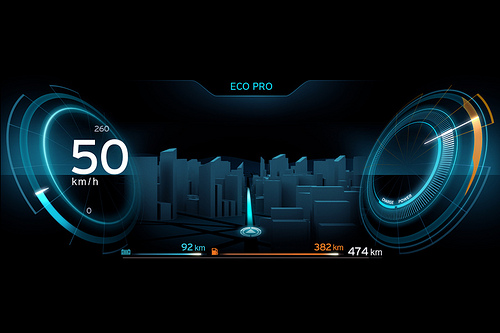
The display featured on the concept i3. The production version is thought to be very similar to this.
The 2013 BMW i3 will be a revolutionary vehicle. It will be be the first mass produced car that has an aluminum frame and a body made just about entirely out of carbon fiber reinforced plastic. It will use a modern version of body-on-frame design with the aluminum drive module made completely separate from the passenger cell with the latter bolted and glued to the frame near the end of the production line. It will be the first all electric car that the BMW group offers for sale and it will be one of the most efficient vehicles ever offered for sale by any major automobile manufacturer.

It will also, have one of the most advanced and connected electronics and display systems. There hasn't been much written about the i3's electronics, but from the photo's that have been leaked so far, it is obvious BMW is working hard to make the driving experience custom tailored to then needs of an electric car driver. Built in navigation system that will list all charging station within your driving range and destination routing that even includes the part of your trip after you leave the car to use public transportation.

One thing that is interesting is there seems to be two numbers offered as the driving range based on your current state of charge, one that is based on normal driving and one based on the use of the Eco Pro mode which will reduce power to the motor and other energy using devices like cabin heating and cooling system. By doing so the car will use less energy and the range will be extended. The Eco Pro mode will undoubtedly give the car a less spirited driving experience, but when your cutting it close with your available range, believe me you will gladly trade off a bit of acceleration to make your destination. By displaying both estimated ranges, it will help the driver to decide which driving mode is best for that given destination.

Besides in car electronics, the i3 owner will have the ability to perform many functions in the car by the use of a smartphone. You'll be able to precondition the battery and cabin to the desired temperature. You'll be able to plug in a destination and the application will tell you if the car can make it there based on it's current state of charge or suggest charging stations to stop at along the route. It will also alert you once a pre-selected state of charge is attained. This can be very useful. Let's say you plugged in and then went off to run some errands while the car reached a certain state of charge necessary for you to make it home, the car will then send you a text message when that percentage is met, alerting you that it's safe to return to the car and begin your journey.


It going to be really interesting to see just what BMW is working on here, but judging from what is currently leaked, I'm thinking it will be pretty useful (and cool!).